
lilybetty 님의 블로그
C# DataGridView간 이동 (DataGridView간 데이터 옮기기) 본문
소개
이 글에서는 DataGridView에 있는 데이터를 또 다른 DataGridView로 이동하는 방법을 차근차근 설명하겠습니다.
DataGridView간 데이터 이동(DataGridView간 데이터 옮기기) 지금부터 시작합니다.
DataGridView 추가하기
디자이너를 사용하여 추가하기
-> DataGridView1, DataGridView2, DataGridView3을 만듭니다.
DataGridView에 Column 추가하기
Column(열) 추가하기
1. DataGridView1 에 이름, 나이, 직업을 추가합니다.
2. DataGridView2 에 이름, 나이를 추가합니다.
3. DataGridView3 에 이름, 나이, 취미를 추가합니다.
DataGridView에 Row 추가하기
Row(행) 추가하기
DataGridView1 에 "홍길동", "30", "개발자" / "김철수", "28", "디자이너" 를 추가합니다.
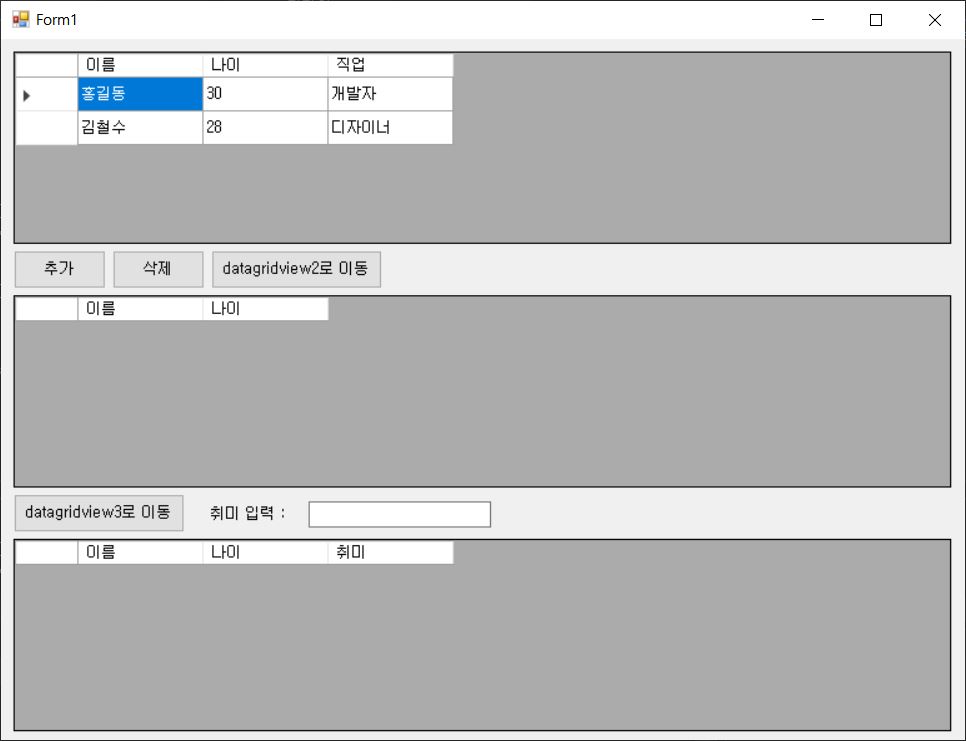
-> DataGridView, Column, Row 추가는 링크 참고하시면 됩니다.
https://lilybetty.tistory.com/9
C# DataGridView 행 추가 방법
DataGridView는 Windows Forms 애플리케이션에서 데이터를 표 형태로 표시하고 편집할 수 있도록 해주는 강력한 컨트롤입니다. 이번 포스트에서는 DataGridView에 행을 추가하는 방법을 단계별로 살펴보겠
lilybetty.tistory.com
DataGridView1 Row 선택하여 DataGridView2로 이동하기
DataGridView1에 홍길동을 선택하여 DataGridView2로 이동 버튼을 클릭하여 DataGridView2로 데이터를 이동합니다.
DataGridView2에는 이름과 나이 컬럼만 있기 때문에 데이터를 이름과 나이만 가져와서 이동시킵니다.
- DataGridView2로 이동 버튼 이벤트
private void btnMove_2_Click(object sender, EventArgs e)
{
    if (dataGridView1.SelectedRows.Count > 0)
    {
        foreach (DataGridViewRow selectedRow in dataGridView1.SelectedRows)
        {
            int rowIndex = dataGridView2.Rows.Add(selectedRow.Cells[0].Value, selectedRow.Cells[1].Value);
            dataGridView1.Rows.Remove(selectedRow);
        }
    }
    else
    {
        MessageBox.Show("이동할 행을 선택하세요");
    }
}
DataGridView2 Row 선택하여 DataGridView3로 이동하기
DataGridView2에 이동시켰던 홍길동을 선택합니다.
그 전에 DataGridView3에는 이름, 나이, 취미 컬럼이 있으므로 취미 행은 값이 없어 TextBox에 넣고 싶은 취미를 적습니다.
DataGridView3로 이동 버튼을 클릭하여 DataGridView3으로 데이터를 이동합니다.
- DataGridView3로 이동 버튼 이벤트
private void btnMove_3_Click(object sender, EventArgs e)
{
    if (dataGridView2.SelectedRows.Count > 0)
    {
        foreach (DataGridViewRow selectedRow in dataGridView2.SelectedRows)
        {
            int rowIndex = dataGridView3.Rows.Add(selectedRow.Cells[0].Value, selectedRow.Cells[1].Value, txtHobby.Text);
            dataGridView2.Rows.Remove(selectedRow);
        }
    }
    else
    {
        MessageBox.Show("이동할 행을 선택하세요");
    }
}
마무리
이제 DataGridView에 Column 열을 추가하고, Row 행을 추가하고 이동하는 이벤트 처리를 다뤄봤습니다.
'C#' 카테고리의 다른 글
| C# DataGridView에 CheckBox 추가 (1) | 2025.03.16 |
|---|---|
| C# DataGridView 행 삭제 방법 (0) | 2025.03.08 |
| C# DataGridView 행 추가 방법 (1) | 2025.03.07 |


